The prompt from the video
I Reverse Engineered the Bloomberg Terminal and Made It FREE

The prompt
Get the Amber Terminal prompt
A Bloomberg-style terminal as one prompt for Claude Code or Codex. It runs on your own computer, with Claude connected to every screen.
The one-shot prompt
Fill in the form to unlock it.
Become an AI trading wizard
“A Bloomberg Terminal costs $32,000 to access for a year for one seat. I’ve made my own version of this.”
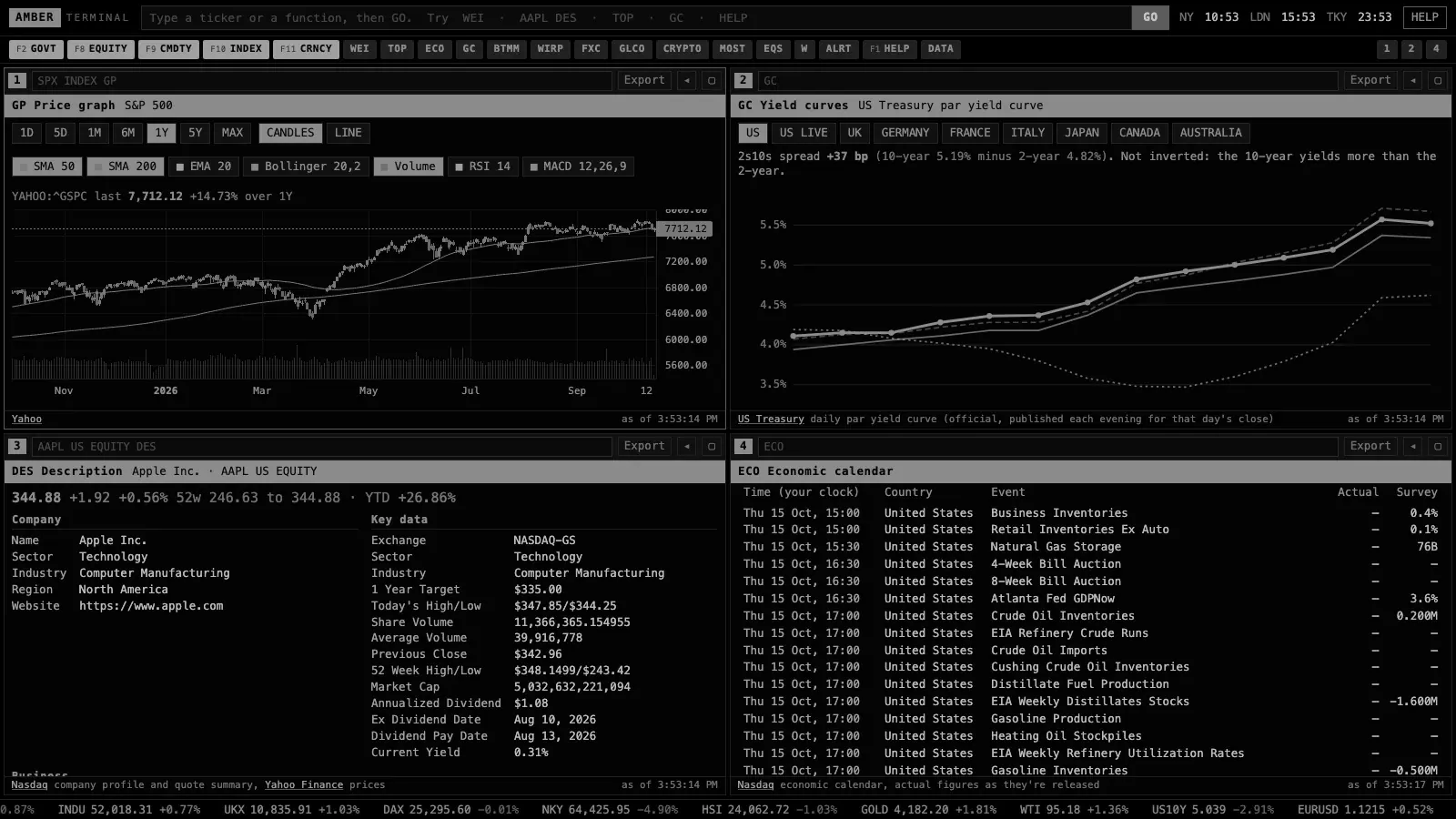
A Bloomberg Terminal costs $31,980 a year for one seat, on a two-year contract. I rebuilt it from Bloomberg’s public pages and public market data, and called it Amber Terminal: the function codes, four panels, your own screens, and Claude reading every screen. Paste one prompt into Claude Code or Codex and it runs on your own computer. It isn’t affiliated with Bloomberg.
Your host

Inside Amber Terminal
Everything
you get.
19 screens
| What | Source | How fresh |
|---|---|---|
| Crypto | Binance, Coinbase, Kraken | Live |
| Stocks, indices, futures, currencies | Nasdaq and Yahoo Finance | Live to 15 minutes behind, by exchange |
| Treasury yields and money markets | US Treasury, Federal Reserve Bank of New York, FRED | Daily |
| Fed rate path | Fed funds futures prices | About 10 minutes behind |
| Filings, insider trades | SEC EDGAR, with full-text search back to 2001 | Minutes after filing |
| Holders | Nasdaq (from 13F filings) | Quarterly |
| Credit spreads | ICE BofA indices via FRED | Daily, one business day behind |
| Treasury auctions | TreasuryDirect | On announcement and result |
| Analyst estimates and ratings | Zacks consensus, published by Nasdaq | Daily |
| Stock screener, dividends | Nasdaq and Yahoo Finance | 200 largest live, the rest last close |
| Options | CBOE | 15 minutes behind |
| News | Public feeds from CNBC, the Wall Street Journal, the FT and others | Minutes |
| Economic releases | Nasdaq, Forex Factory, FRED | On release |
| Central bank rates | Bank for International Settlements | Days |
| Positioning | CFTC Commitments of Traders | Weekly |
Questions
Before you run it.
01Does it cost anything?+
No charge for the prompt or the app. You need Claude Code or Codex to run the prompt, and those come with their own plans.
02Where does the data come from?+
Public sources that need no account: the exchanges, Nasdaq, Yahoo Finance, the US Treasury, the New York Fed, FRED, the SEC, CBOE, the CFTC and the BIS. The table above says how fresh each one is. It’s not a paid exchange feed, so use your broker’s prices to trade.
03Is this Bloomberg?+
No. It’s a Bloomberg-style terminal I built from Bloomberg’s public pages and public data, and it isn’t affiliated with Bloomberg. It covers the screens people use most. It doesn’t have Bloomberg’s paid data, its newsroom or its chat.
04Do I need to know how to code?+
No. You paste one prompt and the agent does the setup.
05How long does it take to set up?+
In my test, Claude Code installed it from the prompt in 31 seconds, including checking every data source. If your computer doesn't have Node.js, the agent installs it first, after asking you.
06Is it real time? Can I day trade with it?+
Crypto is live. Stocks, indices and futures are public quotes, and some exchanges run up to 15 minutes behind; each screen says which. It's a research terminal. If you day trade and already pay for a data feed, ask Claude to plug it in.
07Can I plug in my own paid data feed?+
Yes. Ask Claude, in the folder where you installed it, to add your provider (for example Polygon, Alpaca or Interactive Brokers) with your own key. The app is built so a new source slots in next to the public ones.
08Does it work for UK, European or Indian stocks?+
Yes for prices, charts and company descriptions: type the ticker and the exchange code, like VOD LN, SAP GR or RELIANCE IN. Filings, insider trades, holders and options are for US-listed securities.
09Can I get the data into Excel or Python?+
Yes. Every table exports to a spreadsheet, and the app answers Bloomberg-style BDH and BDP requests as web addresses on your own computer, so Excel and Python on that computer can pull from it. Type API in the app for the exact links.
10Can Claude use it?+
Yes. One line connects your Claude to the terminal, then you can ask things like "what does the futures market price for the next Fed meeting?" and it answers from the same screens. Type ASK in the app for the line.
11Will Bloomberg mind?+
It's my own code, built from Bloomberg's public pages and published help guides and from public data. It uses the function names to describe what each screen does, and it isn't affiliated with Bloomberg or endorsed by it.
12Does it work on Windows?+
Yes. Windows, Mac and Linux, with Node.js 18 or newer.
13Can it trade with real money?+
Not on its own. It’s a research terminal, so you place your trades with your own broker.
14Can I add my own screens?+
Yes. Ask Claude for the screen you want, in the folder where you installed it, and it adds a new function code.
15How do I update it?+
Paste the prompt again in the same folder. Your layout stays.
More videos · 5